
When we get started on a new Shopify Plus SEO campaign a lot of our clients are surprised – not by the amount of work we do, but the type of work we do.
Most of them are used to the SEO team sitting in the background and working on details like site speed and alt text and schema and “SEO content”.
But Shopify, and particularly Shopify Plus, already does a pretty good job of handling technical basics right out of the box. And optimized content, while important, is not enough to win in 2026.
Instead, the most important SEO work on Shopify Plus is usually related to site structure and design. Shopify’s site structure is very flat to start with, which makes the site seem unorganized to Google and hard to understand. And the problem compounds on big sites with large product catalogs.
Fixing this problem requires design work, not technical SEO work. And often, the work is on very visible parts of the site.
You can imagine an ecom director’s surprise when we start an audit and say,
“Hi, yes, your site is great, but in order for Google to rank your pages we’re going to need to change your main navigation and most popular collections.”
The understandable response here is “Excuse me?
We just replatformed.
We spent tens of thousands of dollars designing a site that works.
We were expecting SEO changes to be moderately annoying but relatively un-controversial.
Instead, you’re asking us to modify the biggest hot-button areas on the site… and the few areas the CMO, CEO, and brand team actually care about?
No thanks.”
But in our experience, this is the 20% of work that will drive 80% of your results – not the technical gobbledygook that most folks categorize as “Shopify Plus SEO” because it speaks to Plus-exclusive features.
In this article, we’ll show you specific examples of the design changes we’ll often suggest and more importantly, why we suggest them. Then, we’ll touch on the few technical items that actually matter. Finally, if you have a headless Shopify site, we’ll include a special section for you near the end.
Because Google loves a good listicle (easy to understand, easy to pull into AI overviews), this article is structured as a list of 9 best practices in rough order from most important to least. Let’s get started.
Note: If you’re new here, I’m Josh, founder and lead strategist at High Command. We’re the only SEO agency focused exclusively on Shopify Plus. If you’d like help with your SEO, reach out to learn more about our availability.
At A Glance:
To Optimize Shopify Plus SEO:
If I didn’t need my headings to be snappy for Google, here’s what I’d title this section:
Create Way More Collections Pages Than You Think You Need
Now stick with me for this section, because it might not seem obvious that it’s related to Shopify Plus specifically. And it’s true that “creating more collections pages” isn’t really about Shopify Plus functionality, but rather about the types of brands that are attracted to the platform. I’m talking about mature brands with mature product catalogs.
These brands usually have too few collections compared to their product selection – at least from an SEO perspective. They’ve usually put a lot of thought and effort into how their site is designed, and usually it’s well done. But our SEO conversations almost always start with “Hey, you need more collections on your site.” Below I’ll explain the reasons why and show you what expanding your collections could look like.
Let’s consider the average Google shopper. Say, someone who searches for “brown bed sheets”. They might want light brown, dark brown, patterned or solid. They’re early in their shopping journey and don’t know what they want yet.
Collections pages are designed specifically for this type of browsing. Other pages are pulled in different directions for different types of users. PDPs need to convert; home pages are a brand hub. Collections pages are designed for browsing, and are therefore the best fit for people who are just starting to shop (aka the people you really want to attract).
Now if you want to appeal to all these people, you have to consider something that I call “SEO merchandising.” In other words, you need to position products for how people shop when they’re searching in Google.
For example, let’s say you sell a brown turtleneck like this one:
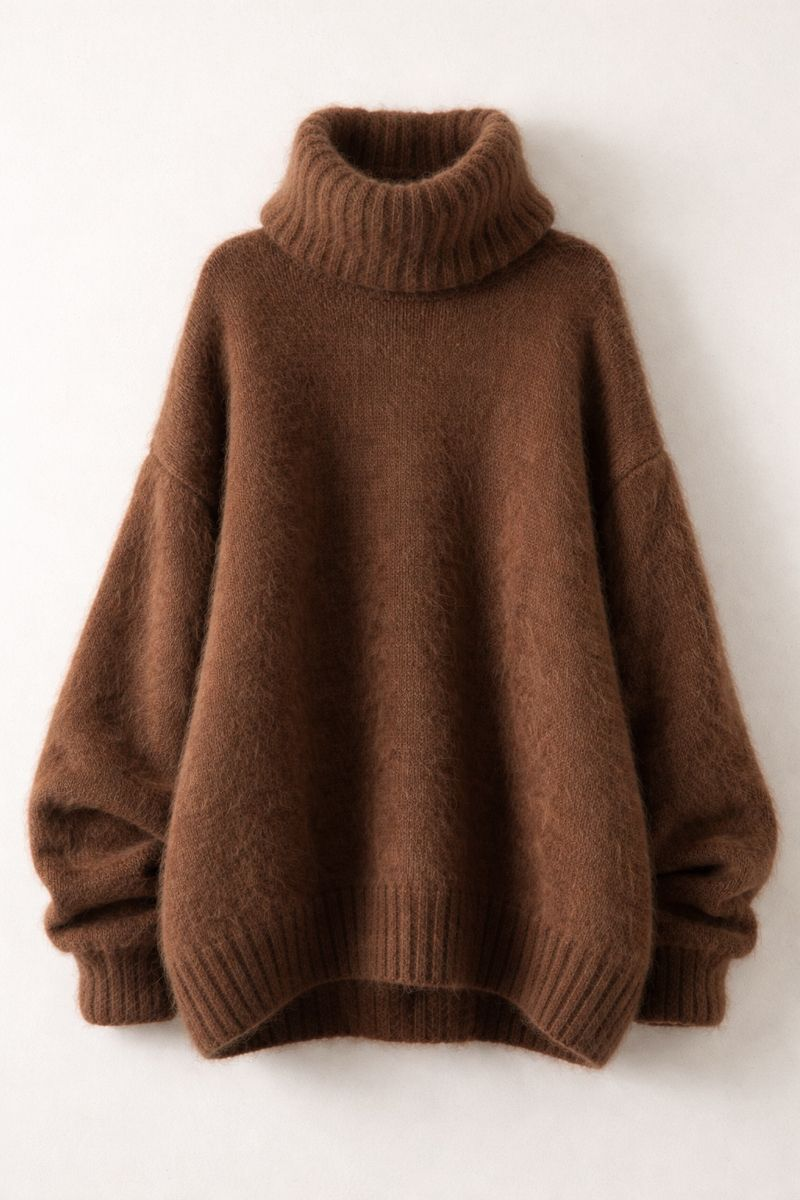

ChatGPT is pretty decent at image creation now huh?
This single product could be a great fit for a bunch of different search terms:
And on and on.
And while one page can rank for multiple terms, many of them will require a dedicated page to rank consistently.
Matter of fact, I checked this list, and while “brown turtleneck” and “chocolate brown turtleneck” show the same results, the rest are unique — which tells us Google treats these as meaningfully different shopping intents. There’s just so much competition that Google can afford to be picky about what page they serve, and often they are.
Next, creating lots of very specific collections can help with AI. For example, as a test, I prompted ChatGPT:
“I’m looking for some medium brown bed sheets to match my quilt. Can you give me a few options?”
In response, ChatGPT searched Google for brown sheets and listed collections as resources:
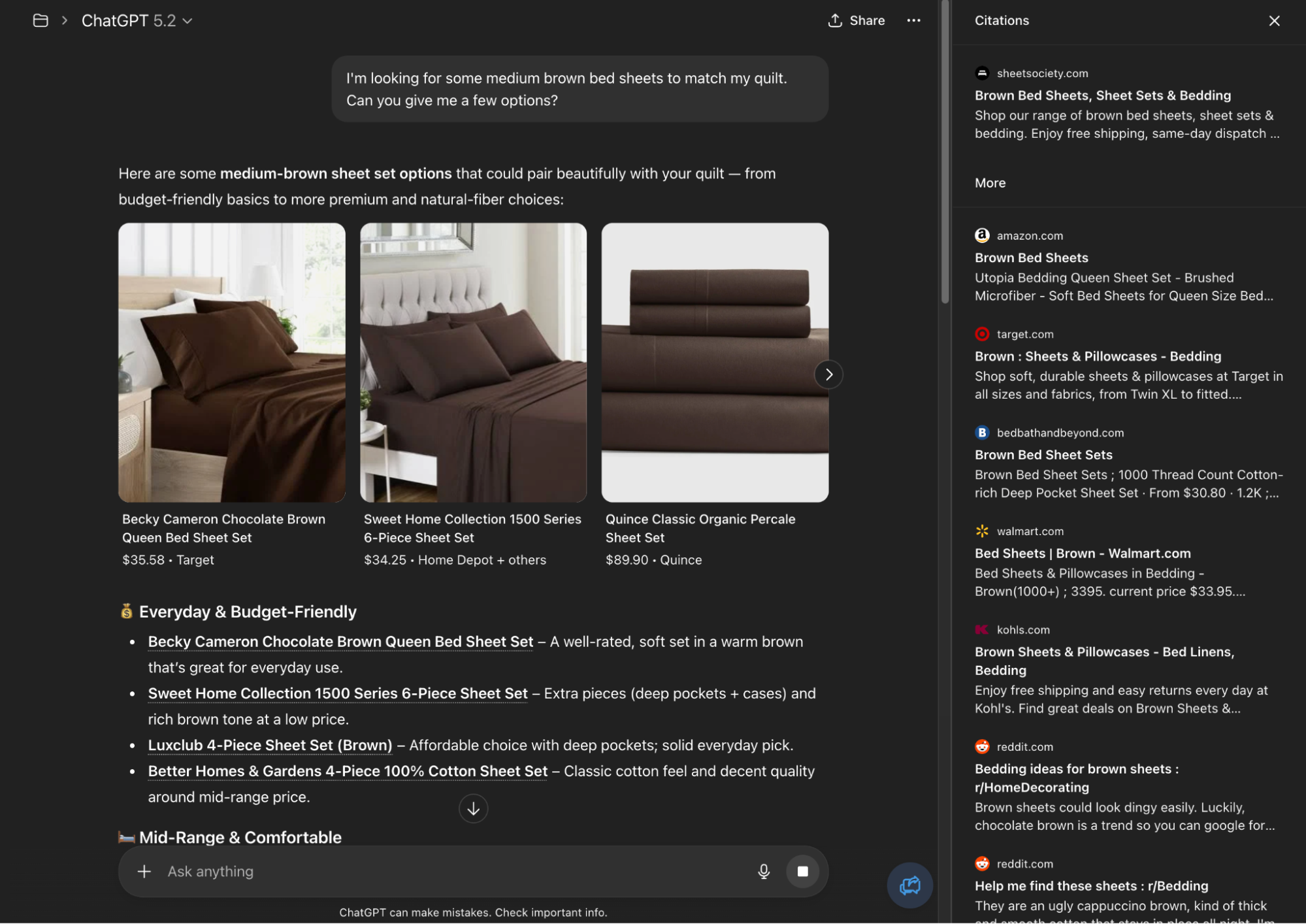
Of course, there is a lot more to ranking in ChatGPT than just collections pages. But we already know that ChatGPT uses Google search (1, 2), and showing up when it does is one part of the puzzle.
In total, we often work with our clients to make dozens (100+ is not unrealistic) of new collections. If we’re honest, this is boring, and there are LOTS of shiny objects that can make it easy to lose focus:
Meanwhile, you’ve created 42 new collections and the SEO team is asking for more. This is where the voice in the back of your head might ask:
“Is this really what we should be focused on?”
And the boring, responsible, lucrative answer is: YES.
The problem is, all of these other features – especially AI results and SERP features – are not reliable right now. ChatGPT and Google are changing at a breakneck pace still, and show different results every couple of months.
Meanwhile, collections pages just won’t die. If AI was the nuclear blast that tore search engines apart, collections are little cockroaches who shrug, say “fine by me” and keep ranking.
Creating and optimizing them is like counting calories and getting 10,000 steps a day while all your friends are doing the latest fad diet. Simple, consistent, reliable.
And of course, you should look after AI and Google Shopping (which is great for SERP features) and everything else. But only AFTER you have enough collections to make your SEO profitable and consistent. And if collections pages can’t make SEO profitable and consistent — well, you probably shouldn’t be doing SEO.
Practical step:
If you want to get started with this yourself, you can use a tool like Ahrefs, or just brainstorm all the different ways you could categorize your products. Then, create collections for as many variations as you can. But a good rule of thumb is to only create a collection if it’ll have 5 or more products within it.
Once you wrap your head around just how many collections pages you need to create, you have to figure out where to put them. And this is where you’ll be working around Shopify’s limitations constantly.
As mentioned earlier, Shopify has an incredibly flat site structure. This is most clear when you compare it to other platforms – like Salesforce Commerce Cloud – that offer what we’ll call “nested collections.”
For example, in Commerce Cloud, you can create a category URL (Salesforce calls collections pages “categories”) that looks like this:
example.com/sheets
And then nest various sub-categories underneath it:
example.com/sheets/percale
example.com/sheets/linen
This structure uses folders to explicitly tell Google “we have a sheets page, then a percale sheets page and a linen sheets page that live directly within it”. The pages are clearly nested and neatly organized.
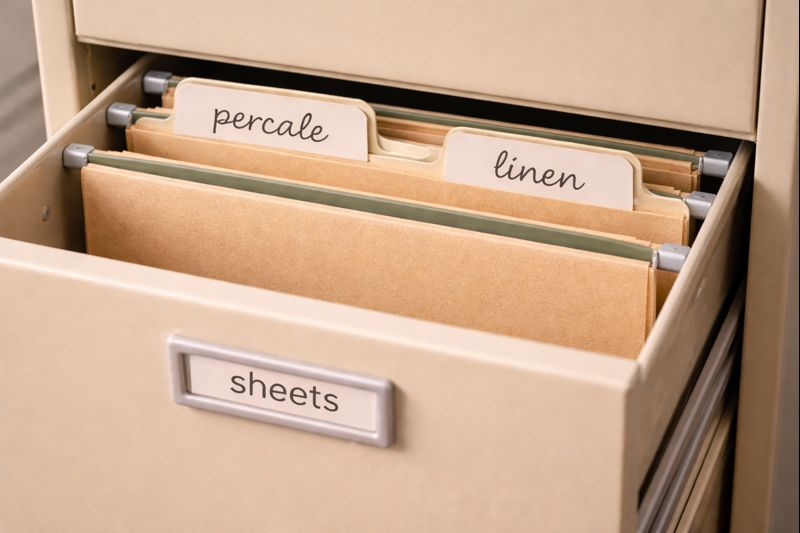
Unfortunately, this structure isn’t possible in Shopify. Instead, their collections are all locked on one level:
example.com/collections/sheets
example.com/collections/percale-sheets
example.com/collections/linen-sheets
This isn’t nearly as organized and the hierarchy is unclear:
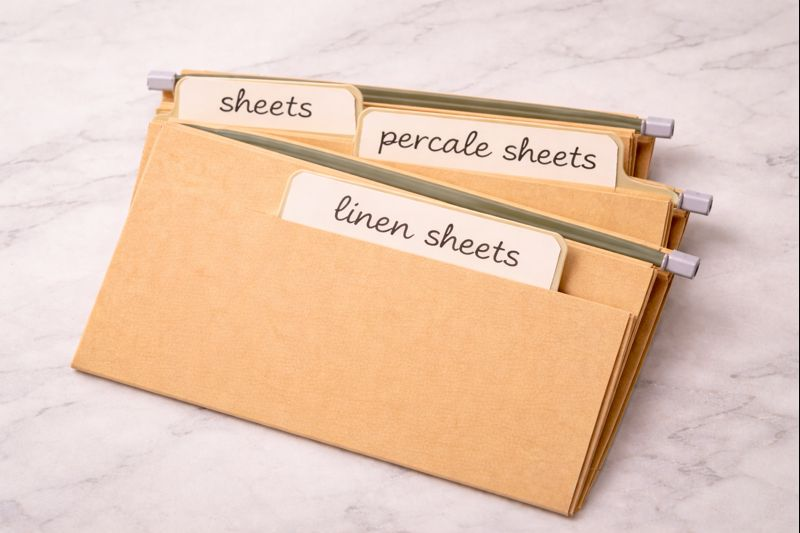
Of course, common sense tells us that percale sheets are a sub-type of sheets, but common sense alone isn’t enough for Google.
Matter of fact, we once had a client come to us after switching from a nested site structure to a flat, Shopify-based structure. In just a couple of months, their traffic dropped by more than half, almost all due to drops in rankings from collections pages:
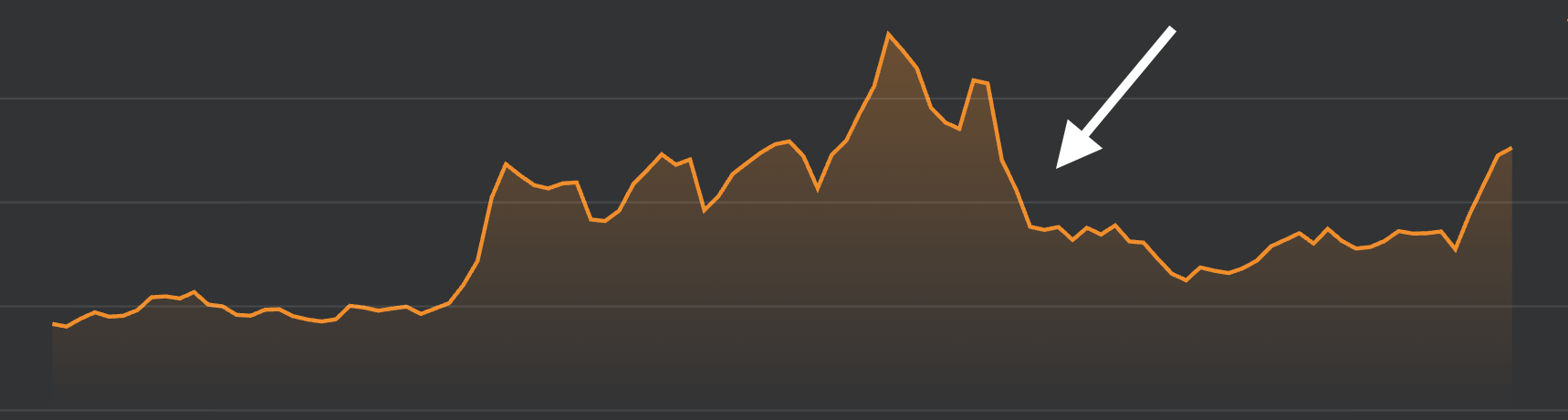
Client’s traffic dropped after site structure change (image from Ahrefs)
And there was one tool that was absolutely critical for turning this site around:
Strong internal links.
The best way to build strong internal links on your site is a well-designed navigation element at the top of your collections pages. Here are four examples of what that can look like:
Note: Not all of these sites are built on Shopify, but the design and functionality are similar to what we’ve created with clients.
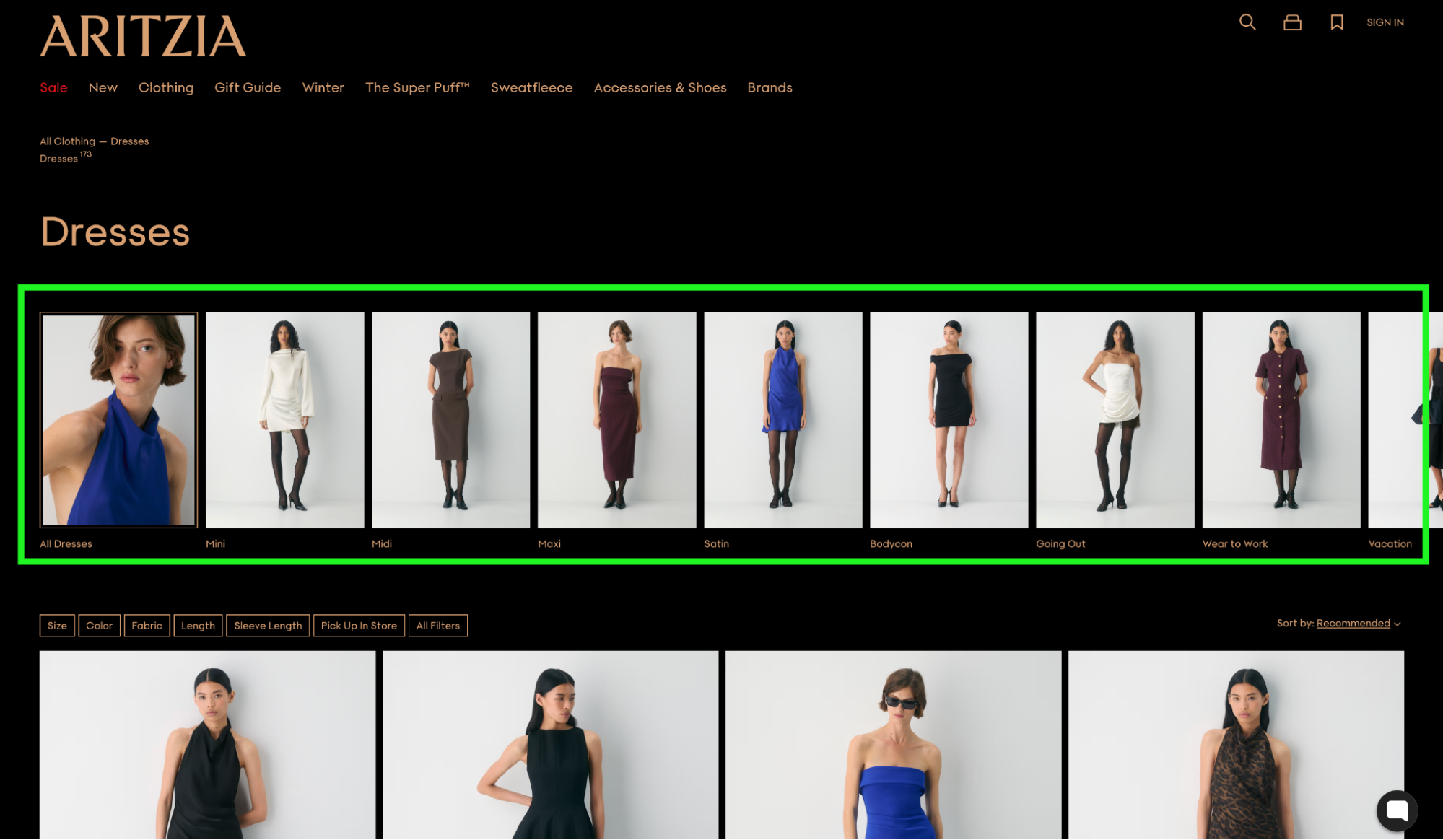
Aritzia has image-based internal links
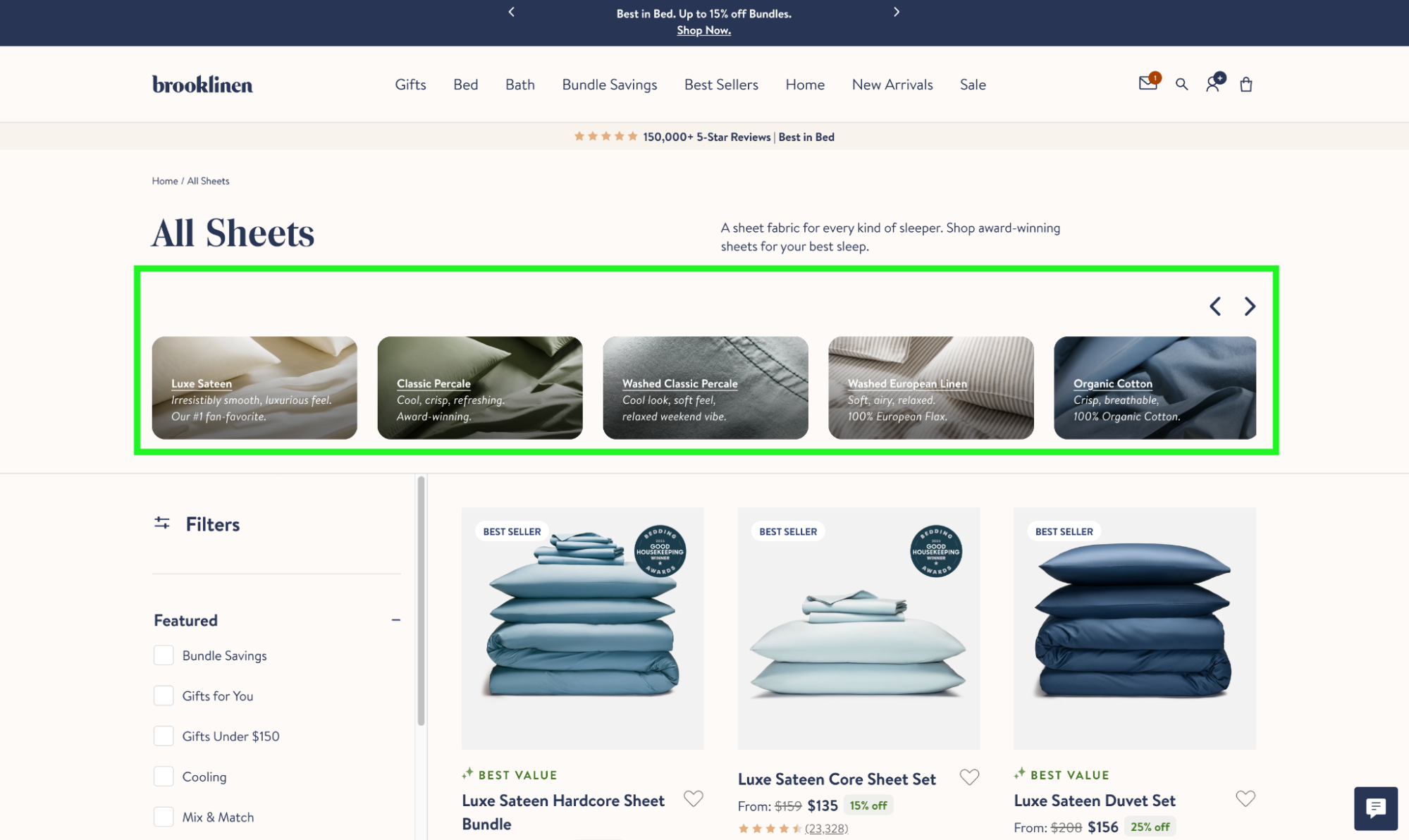
Brooklinen image-based internal links with a little more text.
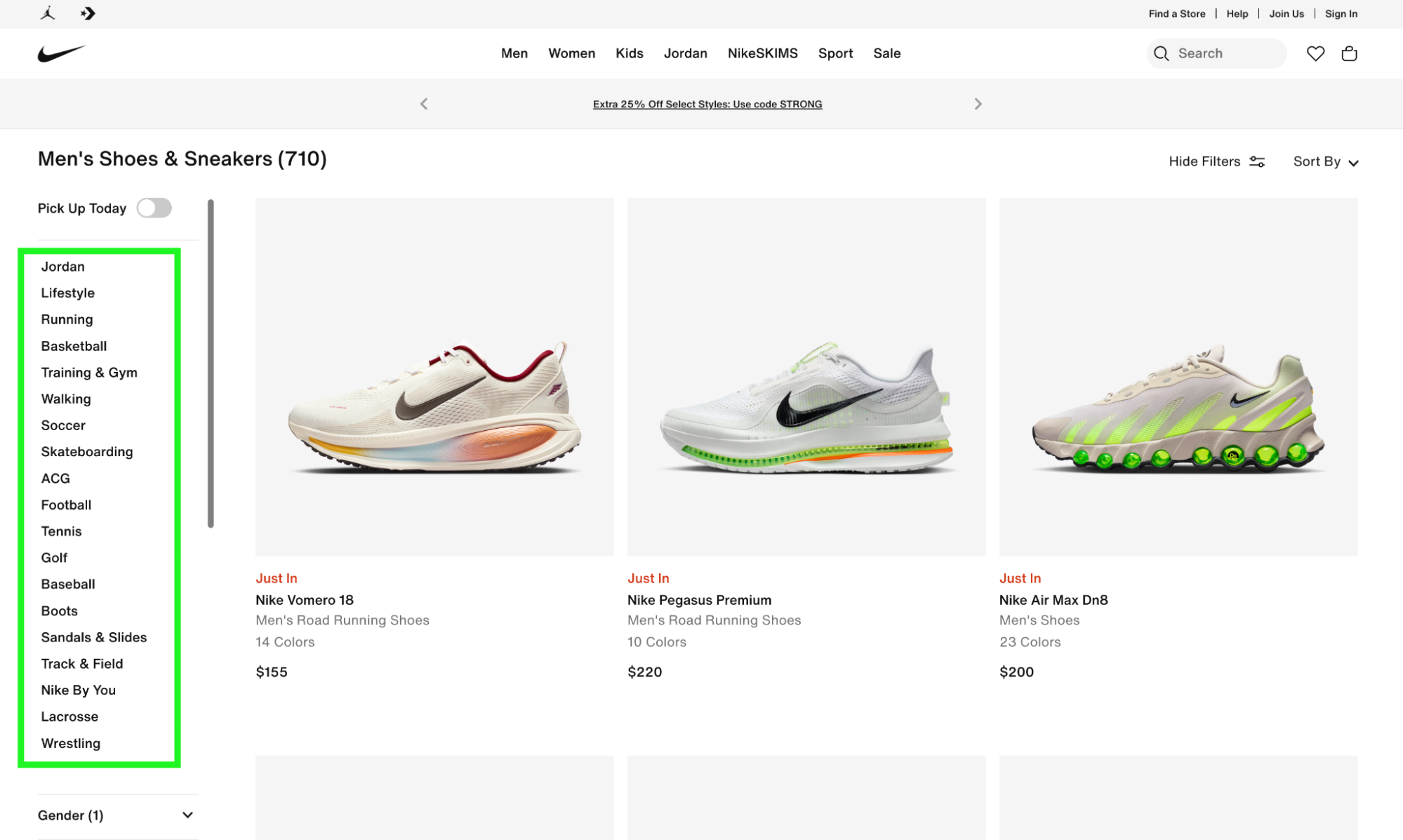
Nike shows a good example of sidebar internal links. Note that filters are below the internal links. The internal links look like filters, but take you to a different page.
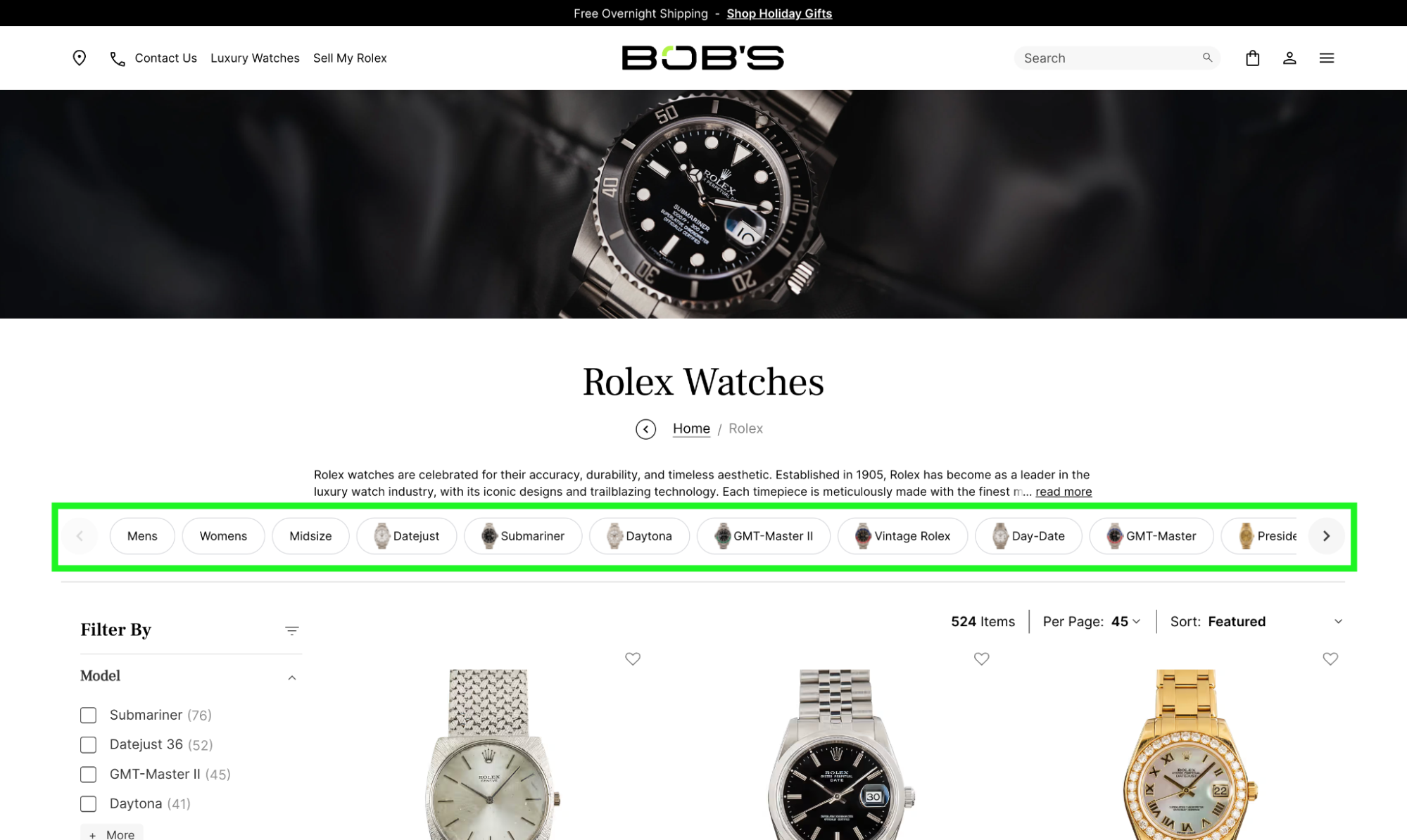
Bob’s Watches features button-based internal links
As you can see, the exact design of the links doesn’t particularly matter.
You can even mix and match different types:
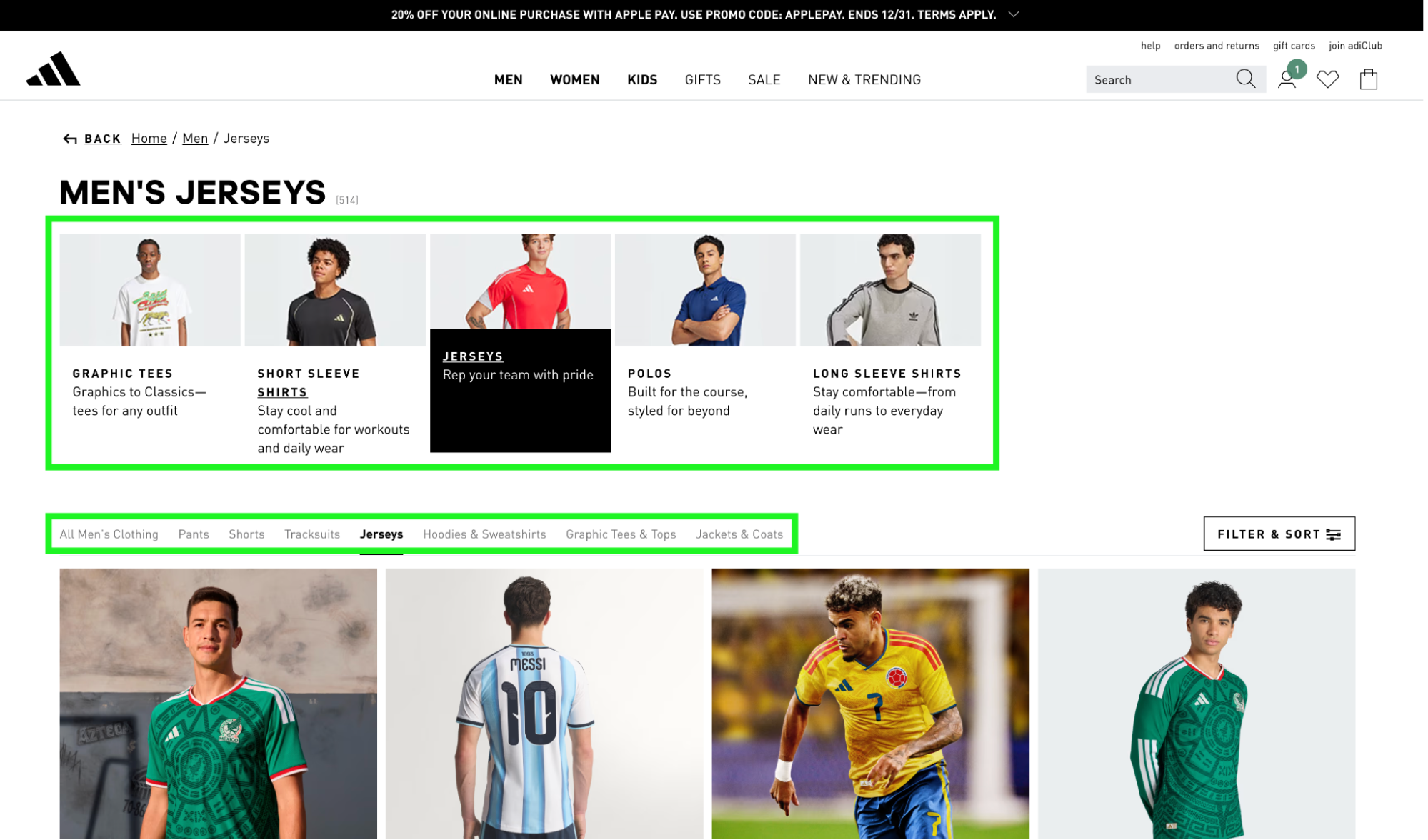
Adidas mixes image-based internal links and simple buttons
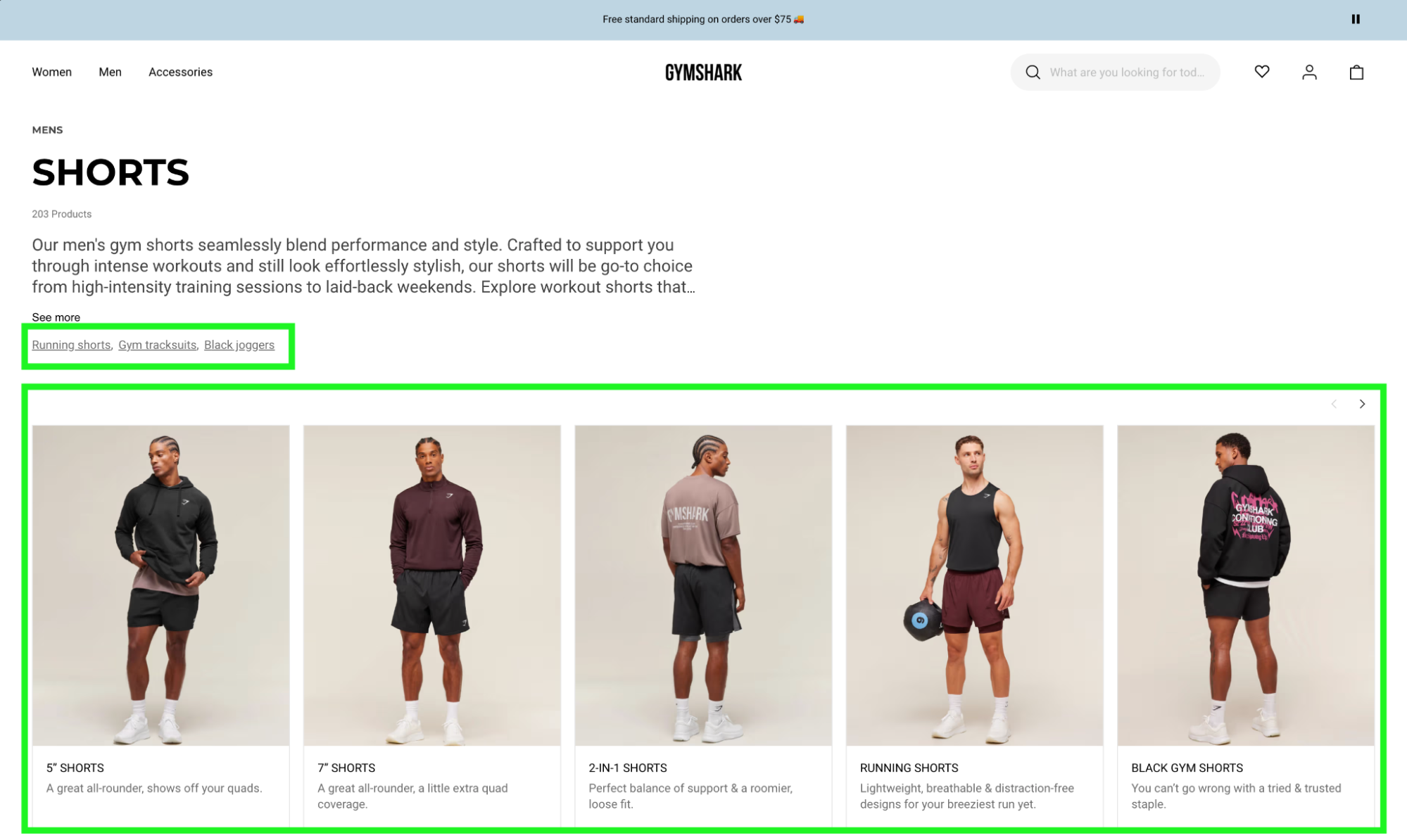
Gymshark uses image-based internal links and simple hyperlinks
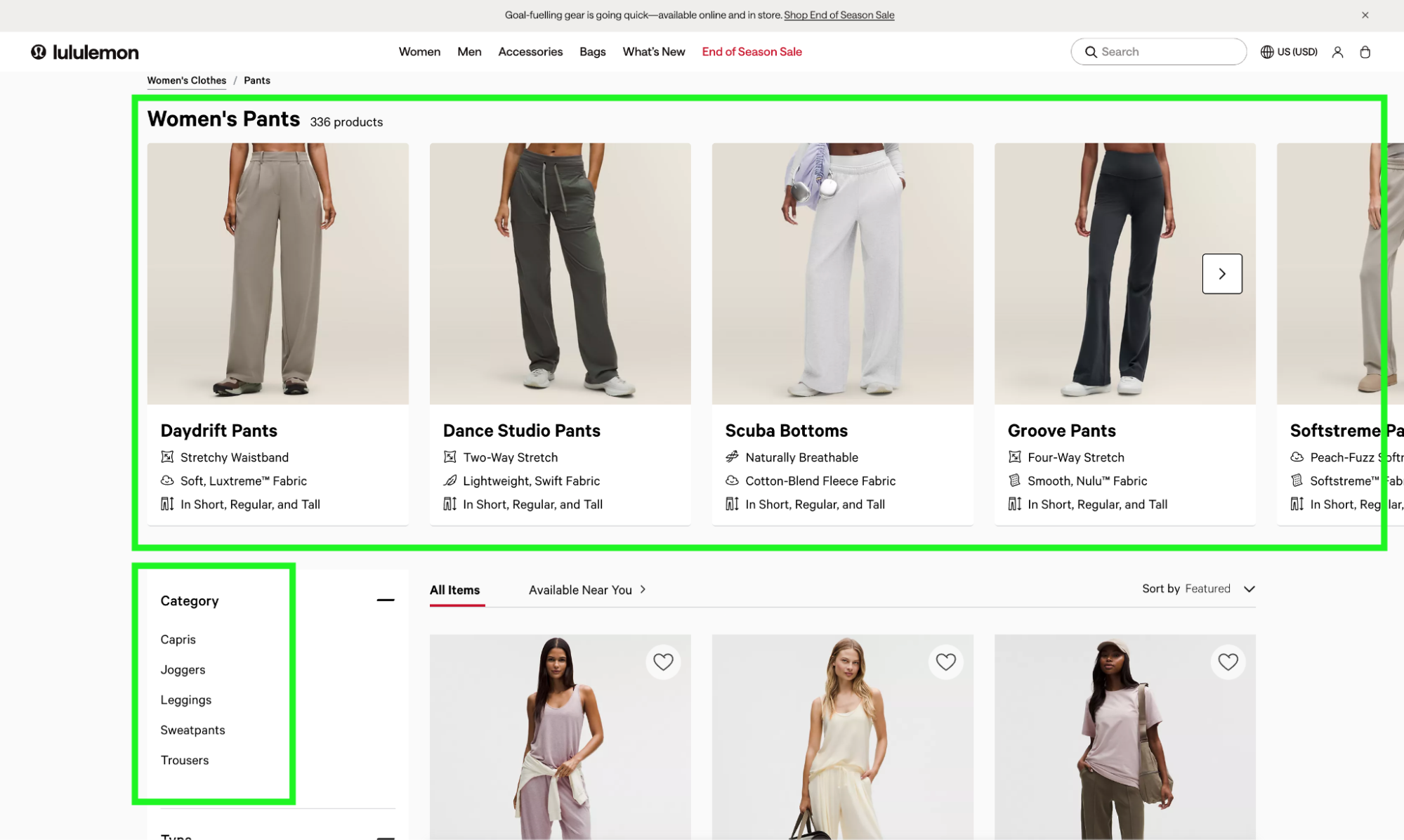
Lululemon mixes image-based and sidebar internal links
Whatever direction you go, it’s important to point the links to unique URLs with custom content (not filters applied to the existing page), and make sure they’re placed above the fold.
Sometimes brands will push back and ask us if they can keep internal links on the bottom of their collections pages instead. Kind of like Gymshark features here:
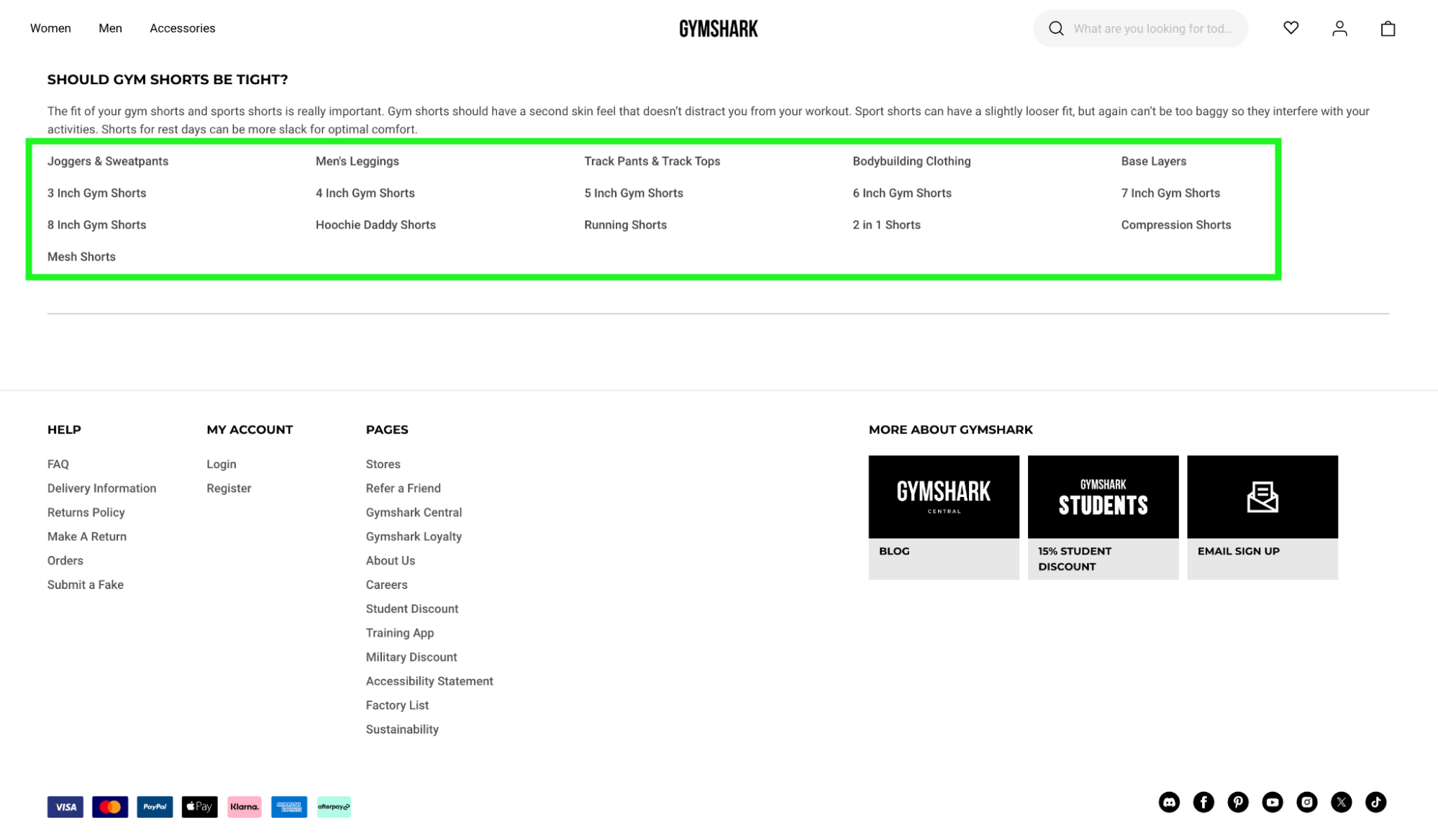
A lot of brands want to push internal links to the bottom of the page, but this won’t work.
Unfortunately, we’ve tested this and it doesn’t work. There simply isn’t enough value in bottom-of-the-page internal links to work well for SEO.
Matter of fact, we tested it on the same client we showed you earlier:
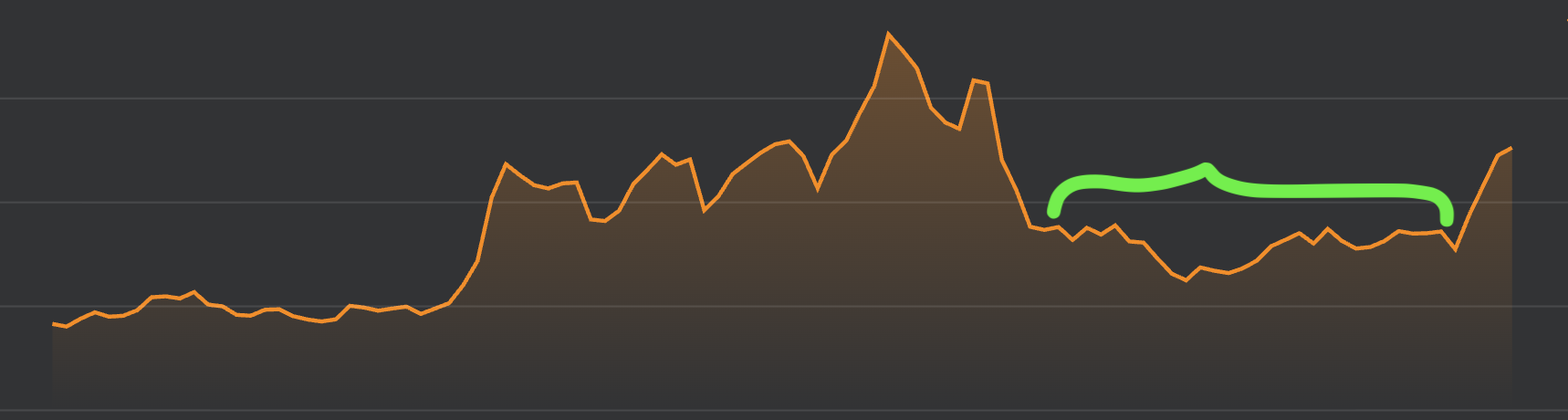
Traffic remained flat when bottom-of-page links were implemented
This client tried bottom-of-page links across the summer, and didn’t get results. It was only when they added top-of-page links to their collections that they saw early signs of growth:
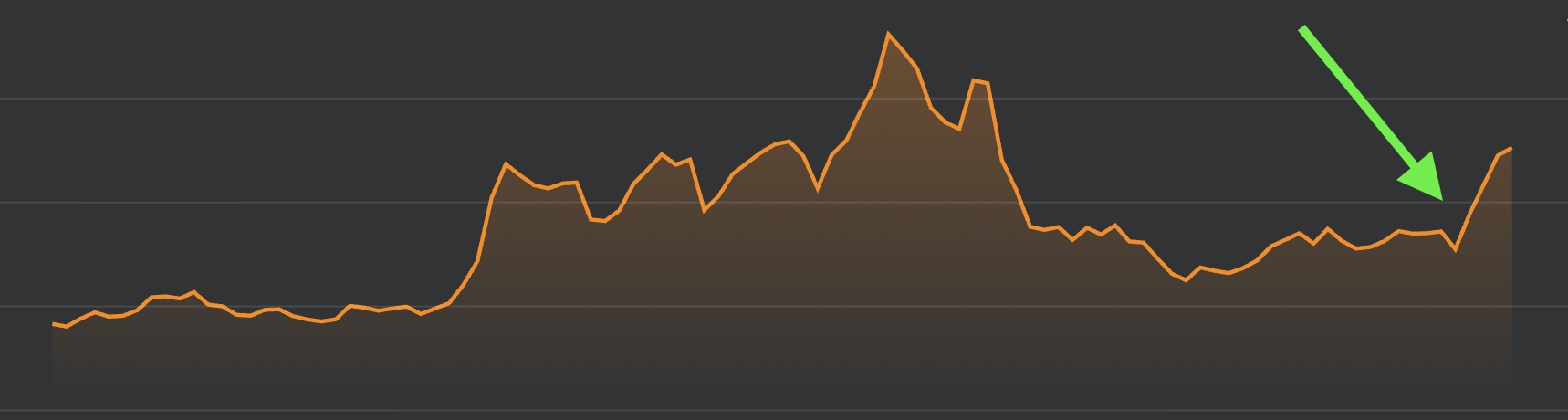
Traffic started to rise immediately when we deployed top-of-page links
Action Item:
Work with your design and dev team to decide on a top-of-page internal link design and get it ready to roll out across your site.
The second place we’d recommend adding strong internal links is in your main navigation. This can be a bit of a hot button issue if your team has put a lot of time and care into your site design, but it’s always a game-changer for SEO.
Here’s the thing: If you look at brands that are successful with SEO, especially in competitive, mature industries, they almost always have robust, well-built out navigations:
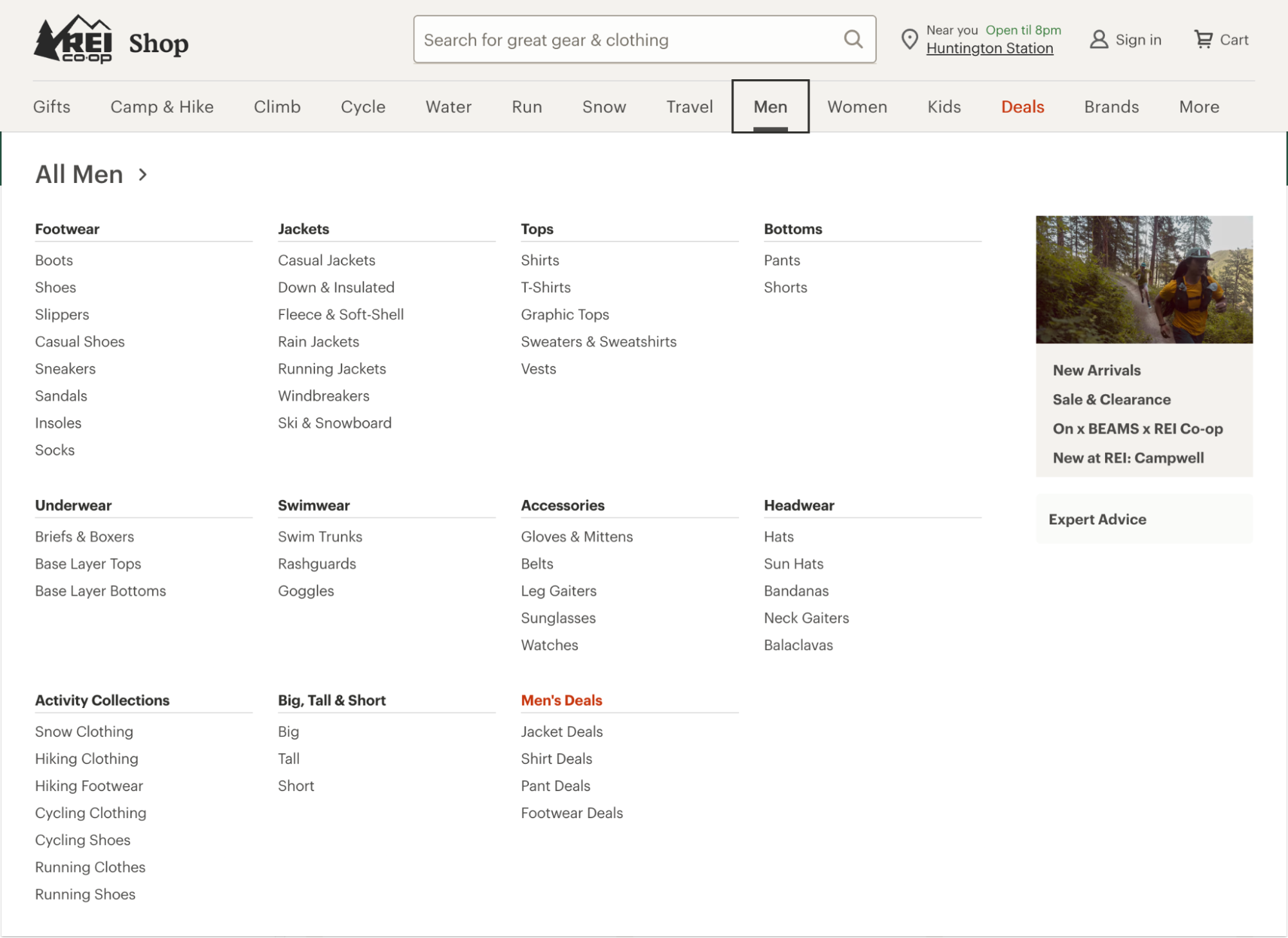
REI has 86 links in one dropdown, and 14 drop-downs.
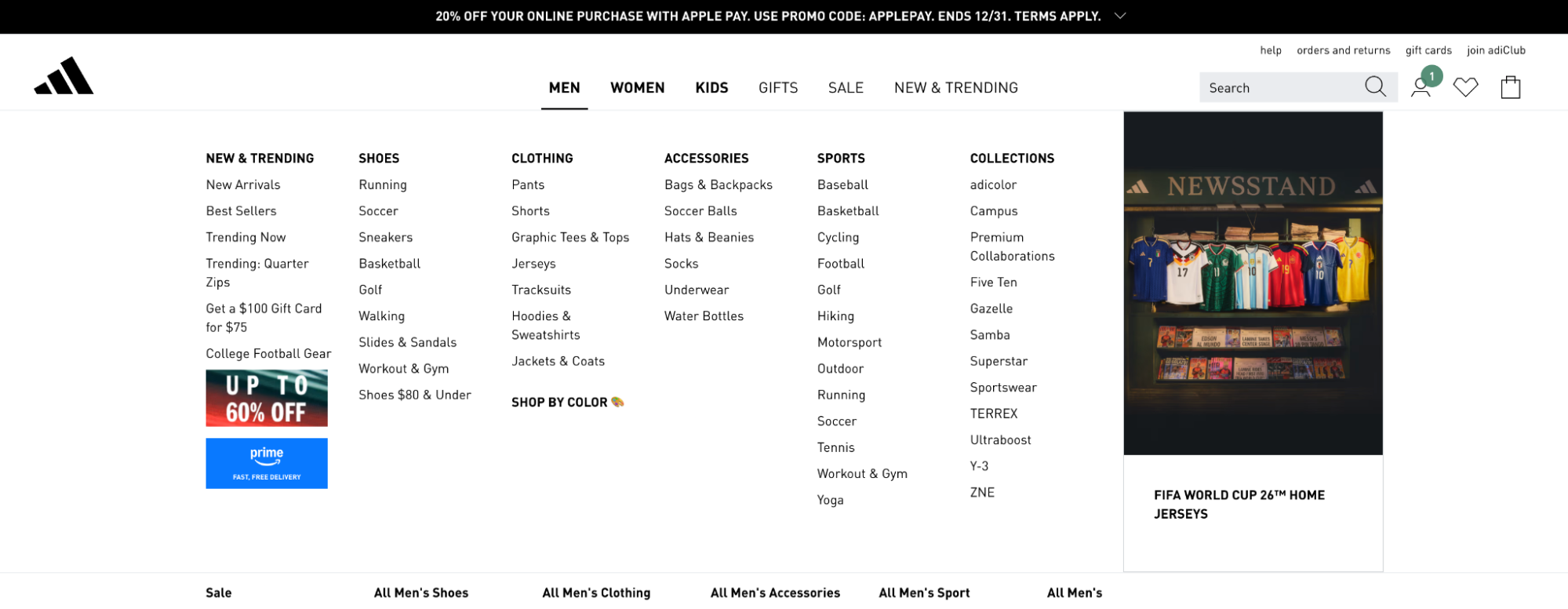
Adidas has 69 links in one drop down, and six drop downs.
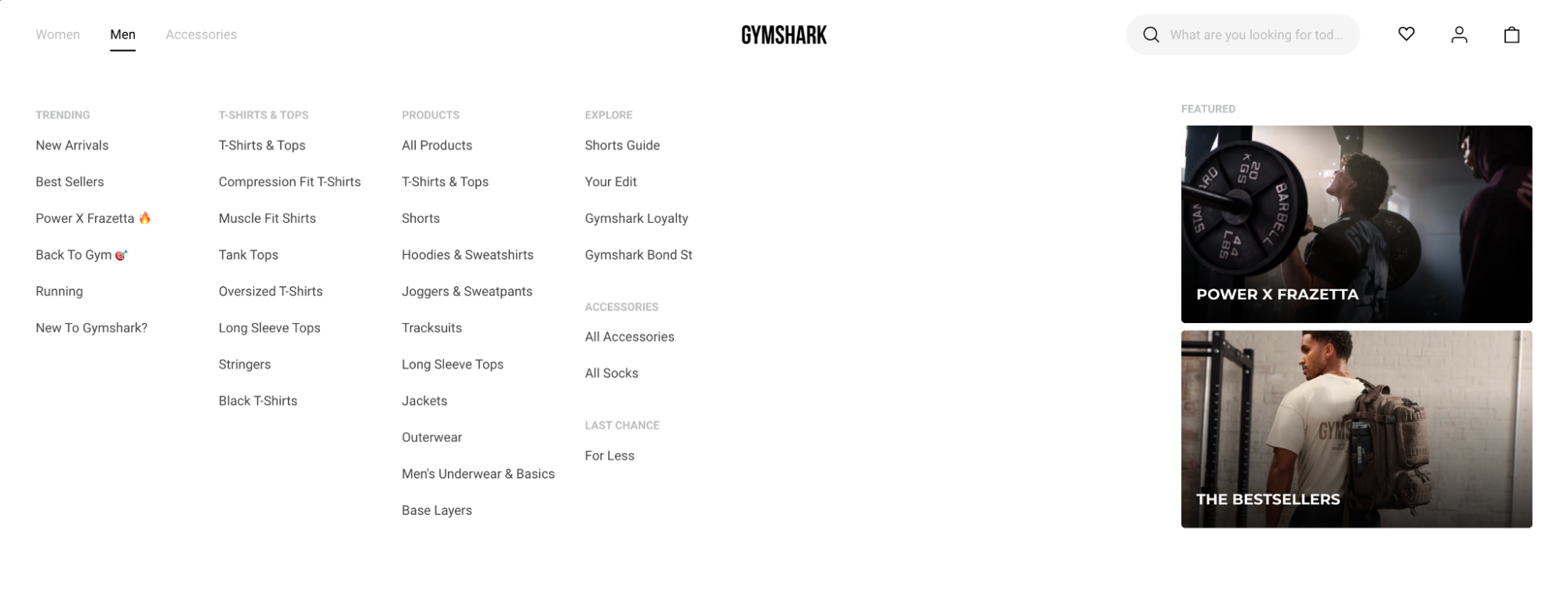
Believe it or not, Gymshark’s nav is on the minimalist side for SEO with 33 links per dropdown and only three dropdowns.
This is even more true for upstart brands that want to take out bigger players in their space.
Take lulus.com for example. A relatively small brand at ~$312M per year, they perform very well in the “dresses” SEO space, despite stiff competition from bigger brands like Aritzia ($800M+ total revenue), Macy’s (~$800M online revenue), and Old Navy (~$900M online revenue).
Look at how extensive Lulu’s navigation is just for dresses:
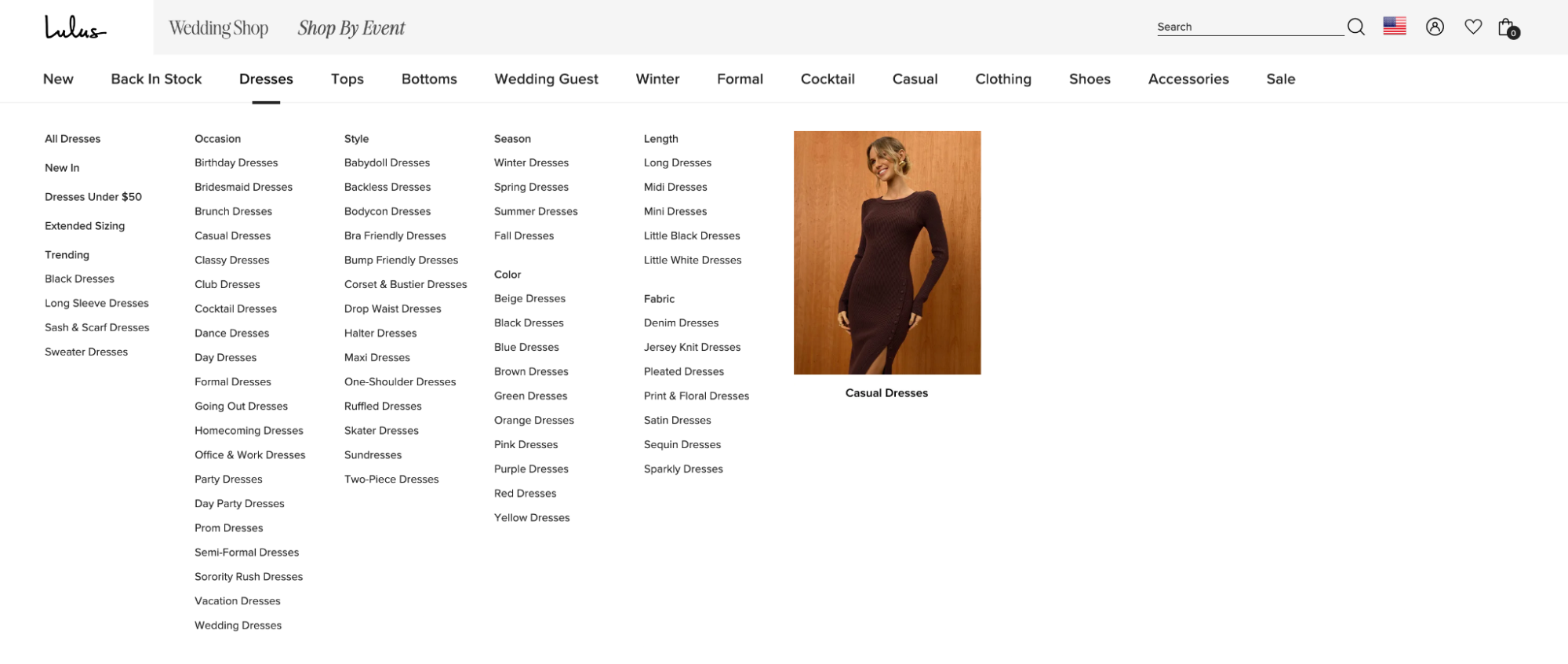
That’s a total of 70 links just for dresses. While the Adidas and REI dropdowns above have more links in total, the Lulu’s dropdown has way more than either for a single category. Adidas has 11 main nav items for men’s shoes; Lulu’s has 70 just for dresses.
So while Lulu’s main nav might seem a bit extreme, it demonstrates how to use that real estate effectively for SEO. If you look up Lulus.com in an SEO tool like Ahrefs, you can see that almost all their dress pages are ranking and bringing in traffic.
Action Item:
Add more space in your main nav for collections links. Between the main nav and the top-of-page internal links, every new collection should go live with at least one link pointing to it.
While you’re thinking about your site design, I’d strongly recommend adding a place for content and internal links at the bottom of your collections pages.
Lululemon and Gymshark both have solid examples of how to do this:
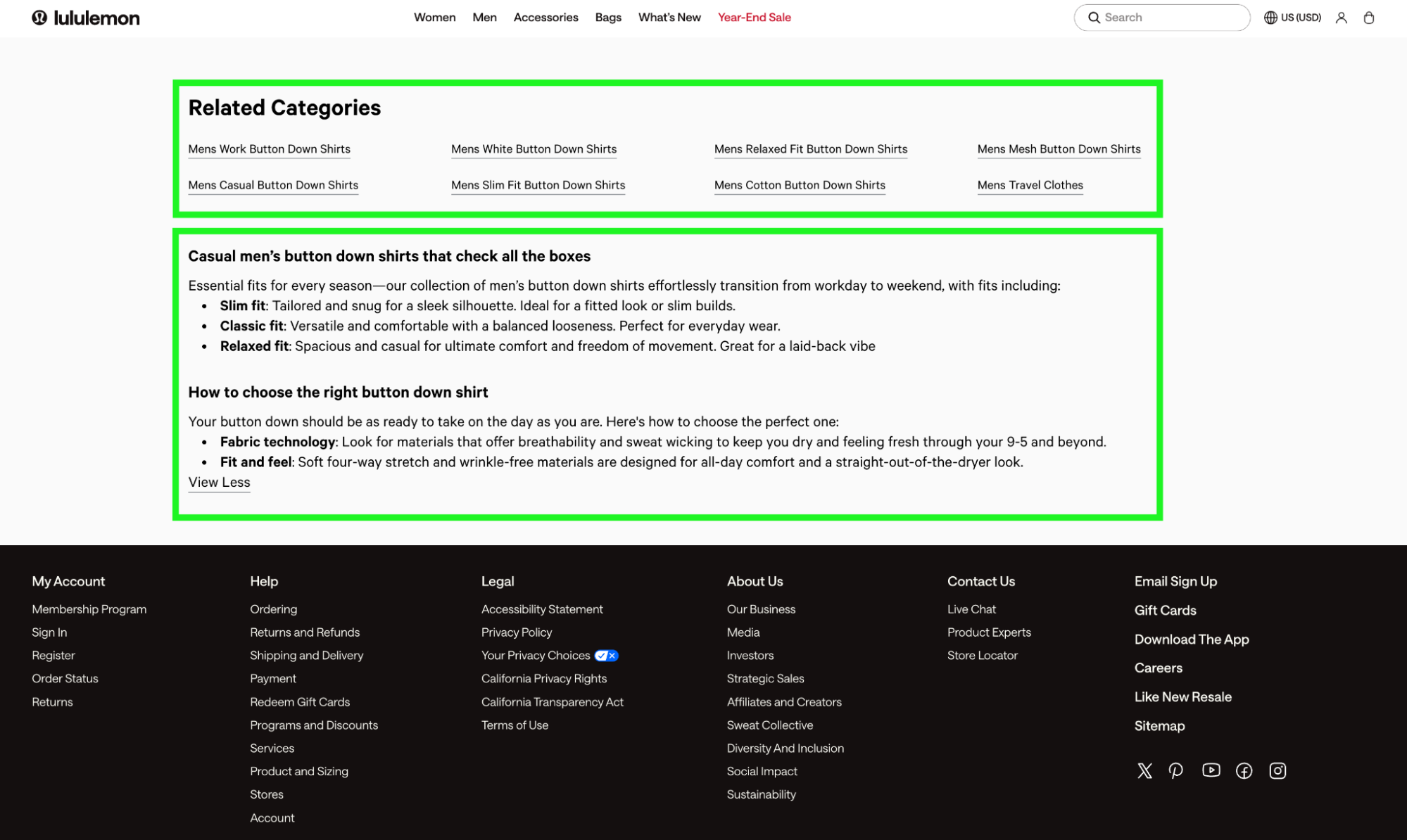
Lululuemon includes “Related Categories” links and SEO-optimized content.
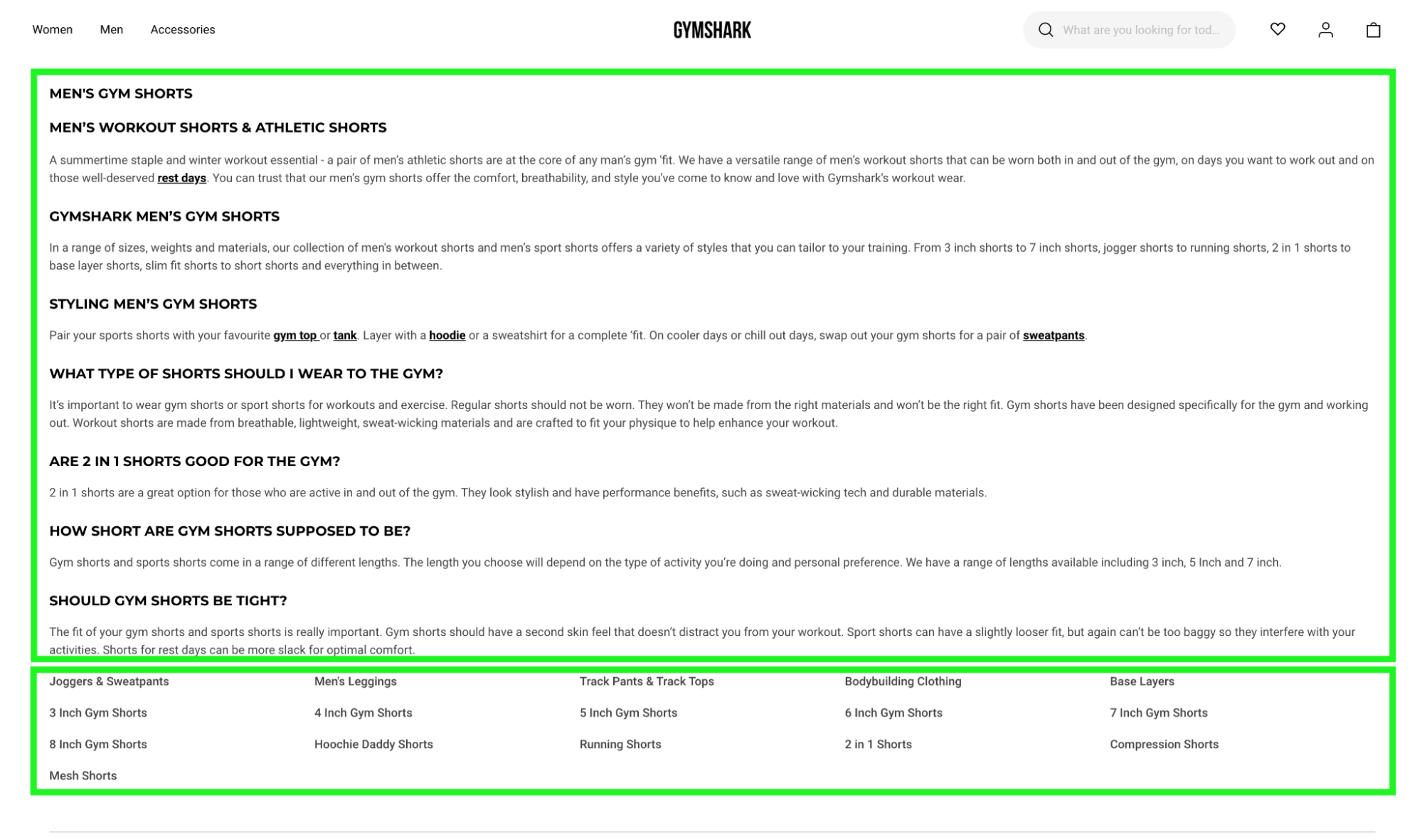
Gymshark Includes an FAQ-focused content section and a variety of internal links.
Again, I can’t emphasize enough that these “bottom of page” links cannot replace top-of-page internal links. They can support other pages, and help you get results more quickly and consistently, but are not enough to generate results by themselves.
Action Item:
Now you have the full collections page checklist. Work with your design and dev team to create a new collection template that includes top-of-page links, bottom-of-page links, and space for content.
To optimize your product pages I recommend covering the basics:
The “how-to” for each of these is a 5-minute Google Search away, and since this guide is a Shopify Plus SEO guide, not a product-page optimization guide, I won’t go into detail here.
But in general, just try to optimize each of these areas to describe the product. Pretend you’re writing it for someone who isn’t familiar with your brand. For example, if you were optimizing a phone case product page, don’t just put “Otterbox Defender” in the meta title.
Instead, write “Defender Drop-Resistant Phone Case in Blue | Otterbox”. This’ll tell Google this product is blue and protective, both interesting to a user who’s shopping around. Don’t worry about keyword research here yet. Just describe the product naturally. That’s enough to get started.
Action Item: Make it best practice on your team to optimize the basics very time a PDP goes live. If your products fall short right now, give them a quick update.
Note:
From here on out we’ll discuss more of the technical quirks and features that matter for SEO on Shopify Plus. But by far the most important SEO elements of your site will be the design features that fix Shopify’s hierarchy issues. If your ecommerce team can get those set up, you’ll already be ahead of 99% of brands.
One of Shopify Plus’ quirks is that it creates duplicate product pages for every collection. For example, if you have one product, like so:
And you put this product in two collections:
Shopify will create new URLs for each collection by literally combining the product and collections URLs together:
Shopify has their reasons for doing this (it helps with dynamic breadcrumbs), but it’s always a net-negative from an SEO perspective. We always recommend modifying this functionality, which is fortunately very easy.
Action Item:
We recommend following Vervaunt’s guide to changing Shopify’s product URL structure to get this done. If you send this to your developer, it should take an hour or less to fix.
A lot of ecommerce sites are prone to suffering from what we call “index bloat”. Index bloat is when your site contains many pages (sometimes hundreds of thousands) that hold no SEO value, but are still visible to Google.
Shopify and Shopify Plus are pretty good about keeping these pages in check since the platform is so buttoned up, but there are still a few areas you should keep an eye on:
If you have subdomains for ads, testing new features, or other purposes, make sure you no-index and block them in robots.txt.
Your web developer will know how to do this, but might not remember to take care of it. I’ve seen dev teams forget, let a few subdomains slip through the cracks, and only notice when organic traffic stalls.
The reason subdomains cause problems is by competing with your main site. For example, which page should Google rank for “blue shoes” if they both have identical content?
To you and me it’s pretty intuitive to rank the www. domain instead of the testing subdomain, but again, intuition isn’t enough for Google. I’ve even seen cases where the “testing” or other subdomains were actually getting more impressions than the default website. So it’s best to stay on top of this and make sure Google can’t see any subdomains it shouldn’t.
This is your reminder to go into Shopify and delete all your old, unused collections pages.
I’m talking about the “collections/spring-2019” or “black-friday-fire-sale” or “collections/old-model-we-stopped-making-three-years-ago” pages.
It’s easy to forget them, but sometimes they can cause problems for SEO. I recommend going in and checking anywhere from once a year to once a quarter. Feel free to adjust your timeline depending on the size of your store and how quickly you generate new or one-off collections.
As a final piece of housekeeping, make sure to set all paginated collections to “no-index, follow”.
I.E. if you have a collection with multiple pages, the second, third, and following pages will typically look something like this:
collections/example?page=2
Best practice is to no-index these pages so they don’t rank. But, leave them marked as “follow” so Google will still follow the links and use them for discovery.
By the way, if you have infinite scroll or a “load more” button on your collections, that doesn’t mean you won’t have paginated pages. If you follow Google’s guidelines on infinite scroll (and you should in this case), you’ll have paginated pages in the background that still need to be managed.
Action Item:
Ask your developer for help:
Then, assign someone on your team the task of cleaning up any old, unused collections.
The final tip on this list is exclusive to headless Shopify Plus stores. Specifically, we’re talking about Javascript, and how to use Client-Side Rendering (CSR) and Server-Side Rendering (SSR). This can get a little technical, so if you don’t understand fully that’s fine. If you send this section to your dev, they’ll almost certainly understand what we’re talking about.
In terms of SEO, headless Shopify Plus stores often rely too heavily on Client-Side Rendering. We’ve seen cases – even from well-regarded dev agencies – where almost the entire site is rendered client side, so there’s no content for Google to see or process.
Instead, the best practice is to use a hybrid approach, where SSR sends a basic skeleton of the page to the browser for an initial load, then CSR is used to fill in assets after the fact.
Specifically, here’s a checklist of items that should be rendered Server-Side for best results:
All of these elements can be generated in simple HTML so Google can at least lay out the page and see what it’s all about. Then, the styling and interactive elements can follow via CSR.
If you take anything away from this article, let it be this:
The 20% of work that will drive 80% of your results is making sure your site is designed and laid out in an SEO-friendly way. There are a few technical pitfalls on Shopify Plus that you’ll want to avoid, but stray too far outside what’s listed in this article, and you risk falling into the pit Shopify’s technical SEO is pretty good out of the box, and if problems do come up they’re generally easy to fix.
Where most brands miss is their site’s layout and structure. To do SEO right with today’s competition, you need prominent areas of your main nav and popular collections dedicated specifically to SEO. If you can find a way to make this happen, your site structure can be a competitive advantage. If not, you may find yourself struggling to rank, especially for the most competitive keywords in your industry.
If you’d like some help optimizing your Shopify Plus store for SEO, reach out. At High Command, we’re the only dedicated Shopify Plus SEO agency. SEO on Shopify Plus is all we do.
Let’s round this article up with a few FAQs – Mostly for Google, but you can read them too if you want 😉
Shopify Plus is generally very good for SEO, though it has a flat site structure and a few other quirks you’ll have to work around.
Yes, there’s still a ton of opportunity in the SEO space for brands on Shopify Plus in 2026. But you have to be willing to design your site around SEO and be willing to work around Shopify’s quirks to take advantage.
Shopify SEO consists of optimizing your site structure, on-page SEO on each page, and fixing technical SEO issues.
Most reputable agencies will require a minimum investment of $5000+ per month for a successful Shopify Plus SEO engagement.
From an SEO perspective, Shopify Plus is limited by their flat site architecture and closed-off backend that limits development options. However, it more than makes up for these drawbacks with ease of use, speed of implementation, and a solid technical foundation.